![eHub-Logo-FullColor-May-15-2024-07-27-43-6708-PM.png]](https://knowledge.ehub.com/hs-fs/hubfs/eHub-Logo-FullColor-May-15-2024-07-27-43-6708-PM.png?height=40&name=eHub-Logo-FullColor-May-15-2024-07-27-43-6708-PM.png)
Get real-time order updates delivered directly to your system without the need for constant API polling.
The Orders Webhook automatically pushes order changes from eHub to your designated endpoint, ensuring your systems stay synchronized with minimal latency.
What is the Orders Webhook?
The Orders Webhook is an event-driven notification system that proactively sends order updates to your application whenever changes occur in eHub. Instead of repeatedly polling our API to check for updates, eHub pushes the data to you automatically.
Key Benefits
- Eliminate Polling Overhead: Receive updates only when changes occur, reducing unnecessary API calls by up to 98%
- Near Real-Time Synchronization: Updates are pushed every 5 minutes, ensuring your systems stay current
- Intelligent Batching: Orders are delivered in batches of up to 100, optimizing network efficiency
- Store-Specific Filtering: Subscribe to updates for specific stores using order_store_id filtering
- Automatic Error Recovery: Built-in retry logic with progress tracking ensures no updates are missed
How It Works
- Subscribe: Create a webhook subscription via the eHub API, specifying your callback URL and authentication details
- Automatic Monitoring: eHub monitors order changes across your selected stores
- Batch Processing: Every 5 minutes, eHub identifies orders updated since the last successful push
- Delivery: Orders are sent to your endpoint in chronological order (by updated_at), in batches of up to 100
- Progress Tracking: On successful delivery, eHub records the timestamp and continues with the next batch
If a delivery fails, eHub saves the progress point and retries in the next scheduled cycle. After 5 consecutive failures, the subscription is automatically disabled to prevent resource waste.
Prerequisites
Before setting up the Orders Webhook:
- API Access: You need valid eHub API credentials
- Webhook Endpoint: A publicly accessible HTTPS URL that can receive POST requests
- Authentication Support: Your endpoint should support HMAC or HTTP Basic authentication
- Store IDs: Know the order_store_id values for the stores you want to monitor
Creating a Webhook Subscription
Step 1: Prepare Your Endpoint
Your webhook endpoint should:
- Accept POST requests with JSON payloads
- Respond with HTTP 200-299 status codes for successful receipt
- Process payloads containing up to 100 order records
- Support HMAC signature verification or HTTP Basic authentication
Step 2: Create the Subscription via API
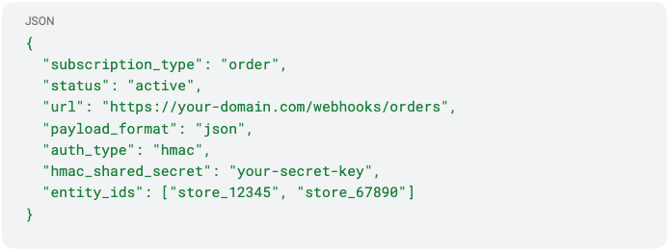
Use the POST /api/v2/subscriptions endpoint to create your webhook subscription:
json
Key Parameters
- subscription_type: Set to "order" for order webhooks
- url: Your HTTPS endpoint that will receive order updates
- entity_ids: Array of order_store_id values to filter which stores' orders are included
- auth_type: Choose "hmac" for signature-based auth or "basic" for HTTP Basic auth
- hmac_shared_secret: Secret key for HMAC signature verification (if using HMAC)
- http_username / http_password: Credentials for HTTP Basic auth (if using basic)
Step 3: Verify the Subscription
After creating the subscription, eHub returns a subscription object with an id. Save this ID—you'll need it to update or manage your subscription later.
Managing Your Webhook Subscription
Updating a Subscription
To modify your webhook URL, authentication credentials, or store filters, use the PUT /api/v2/subscriptions/{id} endpoint:
json
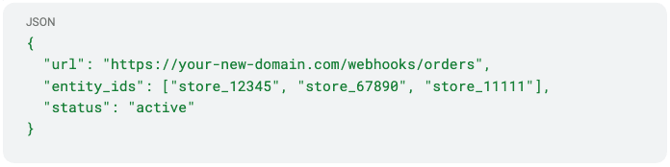
Note: You can update any subscription attribute without deleting and recreating it.
Replaying Missed Events
If you need to replay events from a specific date (e.g., after fixing an endpoint issue), use the rewind_to_date parameter:
json

eHub will replay all events from that timestamp forward in chronological order.
Pausing or Disabling
To temporarily stop receiving webhooks, set the subscription status to "inactive":
json

Reactivate by setting it back to "active".
Webhook Payload Format
Each webhook POST request contains an array of order objects. Here's an example payload structure:
json
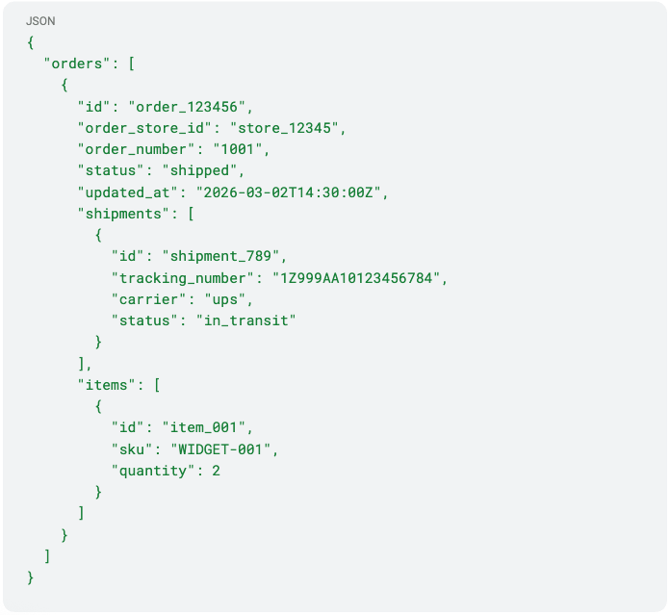
The payload uses the same JSON structure as the GET /api/v2/orders response. For complete field definitions, see the Orders API documentation.
Authentication & Security
HMAC Signature Verification (Recommended)
When using HMAC authentication, eHub includes an X-eHub-Signature header with each request. Verify the signature to ensure the request is from eHub:
- Concatenate the raw request body (JSON string)
- Generate an HMAC SHA-256 signature using your shared secret
- Compare it to the value in the X-eHub-Signature header
HTTP Basic Authentication
If using HTTP Basic auth, eHub includes the credentials you specified in the Authorization header of each request.
Error Handling & Monitoring
Response Codes
Your endpoint should return:
- 200-299: Successful receipt—eHub records progress and continues
- 400-499: Client error—eHub records the error and retries in the next cycle
- 500-599: Server error—eHub records the error and retries in the next cycle
Automatic Disabling
After 5 consecutive failed deliveries, eHub automatically sets the subscription status to "inactive" to prevent wasted resources. You'll need to:
- Fix the issue with your endpoint
- Reactivate the subscription by setting status to "active"
- Optionally use rewind_to_date to replay missed events
Monitoring Your Subscription
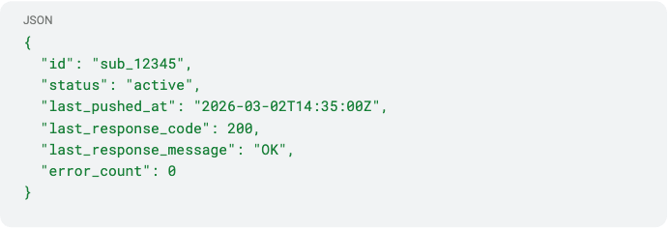
Use GET /api/v2/subscriptions/{id} to check your subscription status and view diagnostics:
json
Best Practices
Handle Duplicates
While rare, your endpoint may receive the same order multiple times (e.g., during retry scenarios). Use the order id or updated_at timestamp to deduplicate.
Process Asynchronously
To respond quickly (within 30 seconds), accept the payload and return 200 immediately, then process the orders asynchronously in a background queue.
Monitor Your Endpoint
Set up alerting on your endpoint to detect:
- Unexpected traffic patterns
- Authentication failures
- Processing errors
Start with One Store
When first testing, subscribe to a single store's orders to validate your integration before scaling to multiple stores.
Use Rate Limit Headroom
Although webhooks significantly reduce your API call volume, remember that you can still use the API for on-demand queries without worrying about hitting rate limits.
Troubleshooting
I'm not receiving any webhooks
- Verify your subscription status is "active"
- Check that your endpoint is publicly accessible via HTTPS
- Ensure your firewall allows inbound traffic from eHub's IP ranges
- Verify your authentication configuration is correct
My subscription keeps getting disabled
- Check your endpoint logs for errors in the 400-599 range
- Ensure your endpoint responds within 30 seconds
- Verify you're returning proper HTTP status codes (200-299 for success)
I'm missing some orders
- Use GET /api/v2/subscriptions/{id} to check last_pushed_at
- Consider using rewind_to_date to replay events from a specific point
- Verify your entity_ids include all the stores you want to monitor
Need Help?
Our documentation is designed to make integration seamless. If you have any questions, contact support@ehub.com—we're happy to assist.
For detailed API endpoint specifications, visit the Webhook Subscriptions API documentation.