![eHub-Logo-FullColor-May-15-2024-07-27-43-6708-PM.png]](https://knowledge.ehub.com/hs-fs/hubfs/eHub-Logo-FullColor-May-15-2024-07-27-43-6708-PM.png?height=40&name=eHub-Logo-FullColor-May-15-2024-07-27-43-6708-PM.png)
Follow these steps to retrieve your API key. You must have Admin and API roles to complete this process.
Step 1: Log into eHub Ship
- Go to app.ehub.com and sign in.
Step 2: Open User Settings
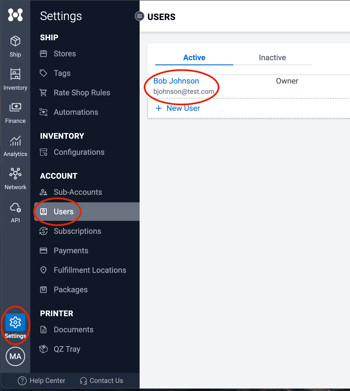
- Click Settings in the bottom-left corner of the page.
- Select the Users tab.
- Locate and select your own user profile.
Step 3: Copy Your API Key
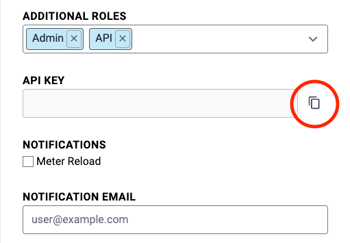
- Scroll to the API Key section.
- Click the Copy API Key icon to copy the key to your clipboard.
Important: Store your API key securely. Do not share it to prevent unauthorized access.
Need Help?
If you have trouble accessing your API key, contact us at support@ehub.com. We're here to help!